
Currently Empty: ₦0.00


How to Build an AI Assistant for Your Business Without Coding (Nigeria Guide)
If you run a small business and want to build an AI assistant without coding, you do not need a developer, a large budget, or months of setup time. Today’s AI and no code tools let you build something that handles real customer facing tasks such as answering common questions, drafting first pass replies, and organising incoming information, often within a single afternoon. This guide walks through exactly how to build an AI assistant for your business without coding, using tools that are already widely available across Nigeria right now.
What Actually Separates an AI Assistant From a Basic Chatbot
A basic chatbot follows a fixed script, and if a customer’s question falls outside that script, the chatbot fails or hands the conversation back to a human. An AI assistant works differently. You give it context about your business, a role to play, and enough flexibility to respond naturally to whatever a customer actually asks, drawing on real information you have provided rather than a rigid decision tree written months in advance. This flexibility is exactly why a well configured AI assistant can handle the messy, unpredictable questions a real business receives every day, instead of only the small handful of questions someone guessed in advance.
Step One: Pick a Single Repetitive Task, Not Everything at Once
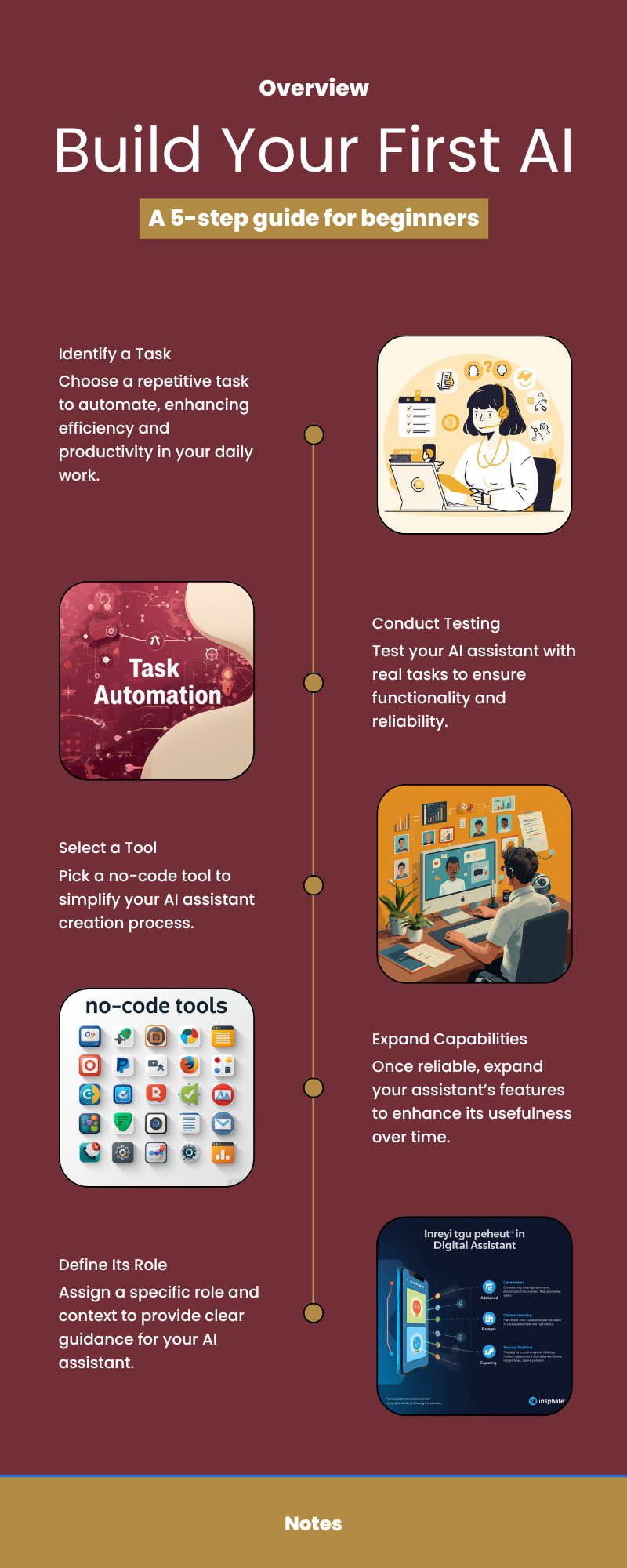
Resist the temptation to automate customer service in general on day one. Instead, choose one specific, repetitive task and start there. This might be answering the five questions your business gets asked most often, drafting a first pass reply to new enquiries before a human refines it, or summarising incoming messages so you can prioritise your day faster. A narrow, clearly defined first task is far more likely to actually work well, and gives you a concrete early win you can build on with confidence rather than a vague, sprawling project that never quite gets finished.
Step Two: Choose a No Code Tool You Can Actually Learn Quickly
You do not need custom built software to do any of this. A number of tools exist specifically to let you configure an AI assistant through a simple visual interface, with no code involved at any stage. If you are new to no code tools in general, our guide to seven no code tools for beginners is a useful starting point for understanding what is available before you commit to one platform in particular.
Step Three: Give It Real Context and Test It Against Real Questions
This step gets skipped more often than any other, and it is the one that makes the biggest difference to how well your assistant performs. Write out clearly who the assistant is speaking to, what it should know about your business including products, prices, common questions, and preferred tone of voice, and what it should never say or promise. Once that context is in place, test the assistant against real questions your business has actually received, not questions you imagine a customer might ask, and adjust its instructions based on exactly where it gets things wrong. An assistant configured with specific, real context performs dramatically better than one left running on generic default instructions.
Where Most People Get Stuck Trying to Do This Alone
Most business owners who attempt this alone reach the same wall. The assistant handles simple test questions fine, then breaks down on the messier, real version of a customer enquiry, and there is no obvious way to diagnose what went wrong. A video tutorial can show you which buttons to click inside a tool. It cannot troubleshoot your specific configuration or explain why your assistant keeps giving unhelpful answers to your actual customers. This is usually the exact point where a short guided session with real time feedback saves hours of frustrated trial and error.
Build Yours With Guided Support Instead of Trial and Error
Our Build Your AI Assistant workshop was designed for exactly this gap. It is a short, live, hands on session where you build a working AI assistant for your own business with guidance available in the room, rather than working alone from a static recorded video. You leave with something you can actually put to use the same day, not just a video you meant to finish watching. The workshop costs 15,000 naira, runs live online for one to three hours, and requires no technical background to join.
Frequently Asked Questions
Do I need to know how to code to build an AI assistant?
No. No code tools exist specifically to let you build a working AI assistant through a visual interface, without writing a single line of code.
How long does it take to build an AI assistant for my business?
A basic, working version can be set up within a few hours once you have chosen your tool and gathered the context it needs about your business and customers.
What can an AI assistant actually do for a small business?
It can answer common customer questions, draft first pass responses, organise incoming information, and handle repetitive, predictable requests, freeing you up for the tasks that genuinely need a human.
Is this really different from a regular chatbot?
Yes. A basic chatbot follows a fixed script and fails outside it. An AI assistant understands context and can respond naturally to a much wider range of real, unpredictable questions.